


Page 6 - Demo
P. 6
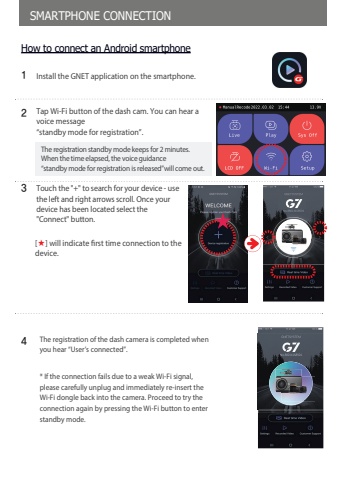
SMARTPHONE CONNECTION%u0013%u0014%u0015%u0012Tap Wi-Fi button of the dash cam. You can hear a voice message%u201cstandby mode for registration%u201d.The registration standby mode keeps for 2 minutes.When the time elapsed, the voice guidance%u201cstandby mode for registration is released%u201dwill come out.How to connect an Android smartphoneInstall the GNET application on the smartphone.Touch the \the left and right arrows scroll. Once your device has been located select the \[%u2605] will indicate first time connection to the device.The registration of the dash camera is completed when you hear %u201cUser%u2019s connected%u201d. * If the connection fails due to a weak Wi-Fi signal, please carefully unplug and immediately re-insert the Wi-Fi dongle back into the camera. Proceed to try the connection again by pressing the Wi-Fi button to enter standby mode.


