


Page 4 - Demo
P. 4
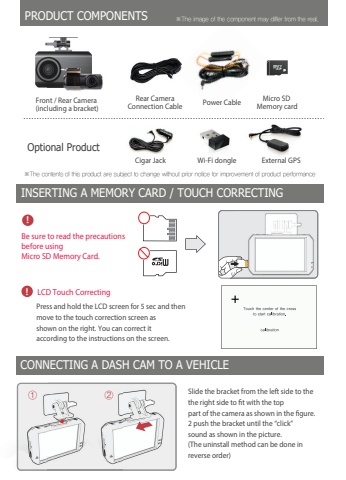
INSERTING A MEMORY CARD / TOUCH CORRECTINGCONNECTING A DASH CAM TO A VEHICLEBe sure to read the precautionsbefore usingMicro SD Memory Card. ,PRODUCT COMPONENTSPower Cable Rear CameraConnection Cable%u2cbc5IF%u0001DPOUFOUT%u0001PG%u0001UIJT%u0001QSPEVDU%u0001BSF%u0001TVCKFDU%u0001UP%u0001DIBOHF%u0001XJUIPVU%u0001QSJPS%u0001OPUJDF%u0001GPS%u0001JNQSPWFNFOU%u0001PG%u0001QSPEVDU%u0001QFSGPSNBODF%u2cbc5IF%u0001JNBHF%u0001PG%u0001UIF%u0001DPNQPOFOU%u0001NBZ%u0001EJGGFS%u0001GSPN%u0001UIF%u0001SFBM%u000fFront / Rear Camera (including a bracket)%u2d18 %u2d19Press and hold the LCD screen for 5 sec and thenmove to the touch correction screen asshown on the right. You can correct itaccording to the instructions on the screen., LCD Touch CorrectingSlide the bracket from the left side to thethe right side to fit with the toppart of the camera as shown in the figure.2 push the bracket until the %u201cclick%u201dsound as shown in the picture.(The uninstall method can be done in reverse order)Micro SD Memory cardCigar Jack External GPSOptional ProductWi-Fi donglent / Rear Cameraluding a bracket)


